转载备注:转载归档文章;感谢公司SRC小姐姐帮我文章美化那么多,赞赞赞~~~
写在最前面:
相信有认真关注我们公众号的小伙伴都看出来了,这是一系列介绍顺丰网络安全DFIR(数字调查与事件响应)平台从0到1实践之路的连载文章。如果你还没看过前面文章,为了可以更快速吸收本篇文章的精髓部分,笔者建议先从第一篇开始往后追。
-
第一篇:《浅谈网络安全事件调查那些事》
-
本篇:《Velociraptor实践-KoiMiner排查》
前面几篇介绍了事件调查响应的生命周期和方式,Velociraptor是什么(一款网络安全事件调查平台),顺丰网络安全选择使用Velociraptor来实现事件调查响应工程化的原因,以及Velociraptor的部署和基础操作。

说明:
• 本文仅简单演示排查KoiMiner木马过程,未分析病毒文件、未溯源;关于该木马更详细情况请参考文章: 《KoiMiner挖矿木马变种入侵,超5000台SQL Server服务器被控制》;
• 本文主要演示Velociraptor在实际调查过程中可以用到的思路和方法,思路方法并不唯一,可以根据需要灵活调整;
• 默认认为阅读该文档读者已具备初步使用Velociraptor能力。
一、背景
“嘀嘀嘀,嘀嘀嘀”,安全响应平台的一条告警通知响起,显示某终端出现了异常活动,我立刻打开安全监控平台,查看了相关告警详细信息。

A new process has been created.

Creator Subject:
Security ID: SYSTEM
Account Name: MSEDGEWIN10$
Account Domain: WORKGROUP
Logon ID: 0x3E7

Target Subject:
Security ID: NULL SID
Account Name: -
Account Domain: -
Logon ID: 0x0

Process Information:
New Process ID: 0x179c
New Process Name: C:\Windows\System32\attrib.exe
Token Elevation Type: %%1936
Mandatory Label: Mandatory Label\System Mandatory Level
Creator Process ID: 0x2270
Creator Process Name: C:\Windows\Help\csrss.exe
Process Command Line: "C:\Windows\System32\attrib.exe" C:\Windows\Help\lsass.exe -s -r -a -h
相信大家也注意到了,该告警中出现了lsass.exe执行命令的特征,是可疑告警;因未确认该告警真实性以及具体告警原因,本次调查按照通用事件调查方式方法展开。
二、排查
告警中出现进程信息,优先从进程信息入手:
1. 查找进程信息,确认进程是否存在风险;
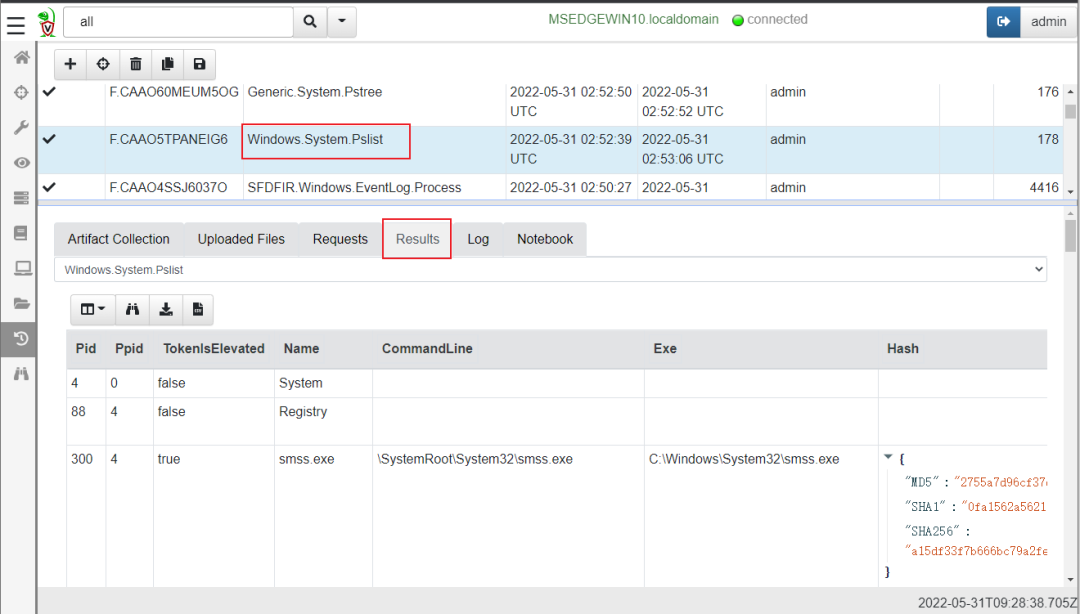
1.1 从告警记录中的Creator Process ID字段可得知Pid是8816(0x2270);使用Windows.System.Pslist工件获取进程列表信息:
1.2 为了快速定位到目标进程,切换到Notebook标签页,修改原始VQL语句,筛选出目标进程信息;其中过滤条件是PID=8816
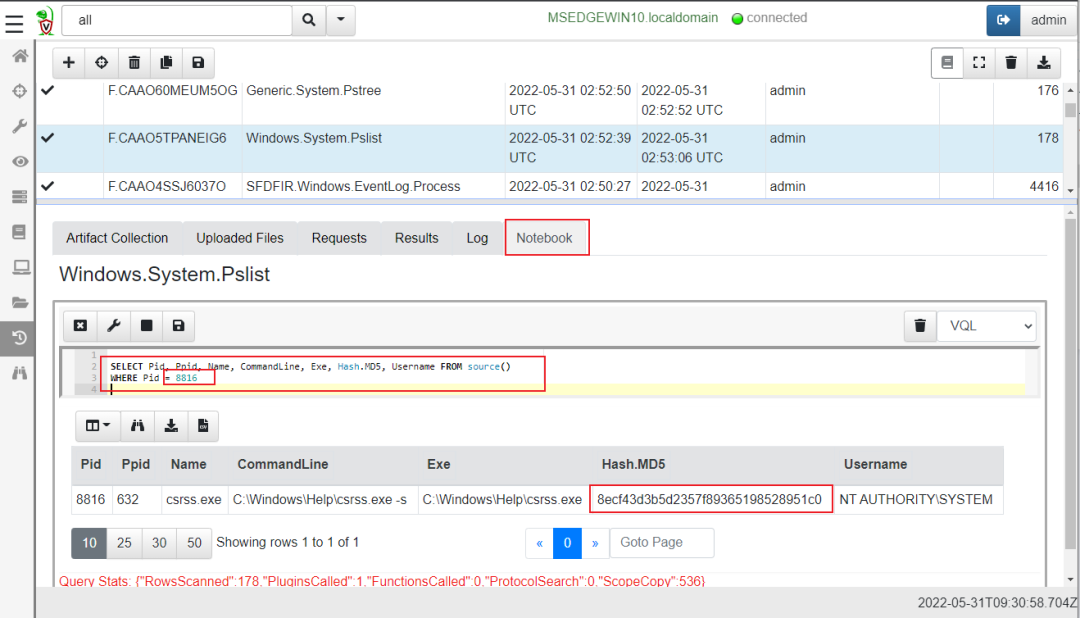
将该MD5值(8ecf43d3b5d2357f89365198528951c0)丢到微步进行情报数据关联:
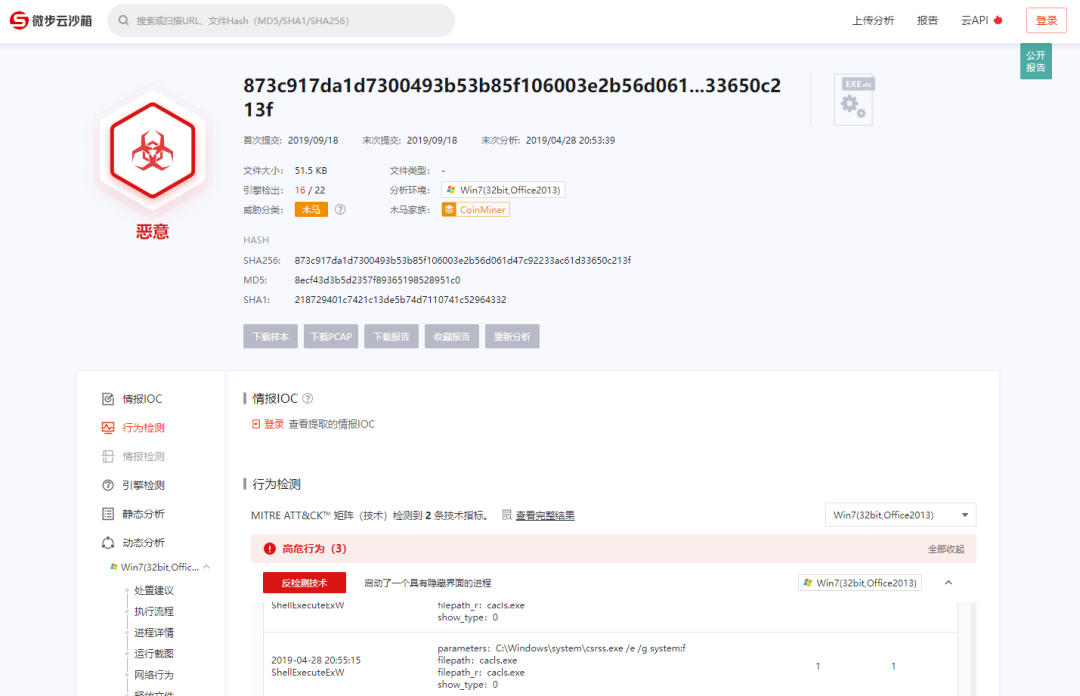
根据情报信息可以确认该进程是恶意进程,需要进一步确认排查。
1.3此时找到父进程PID=632,添加VQL的Pid为632的条件,进一步确认父进程详情:
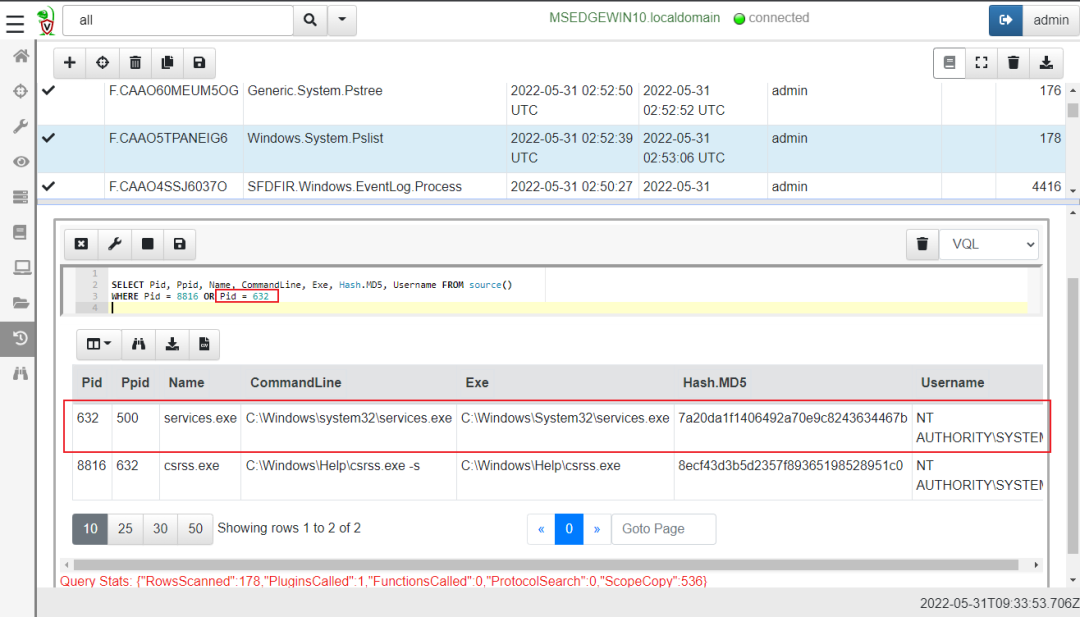
可以看到父进程是系统服务进程,同样查看下父进程的MD5(7a20da1f1406492a70e9c8243634467b):
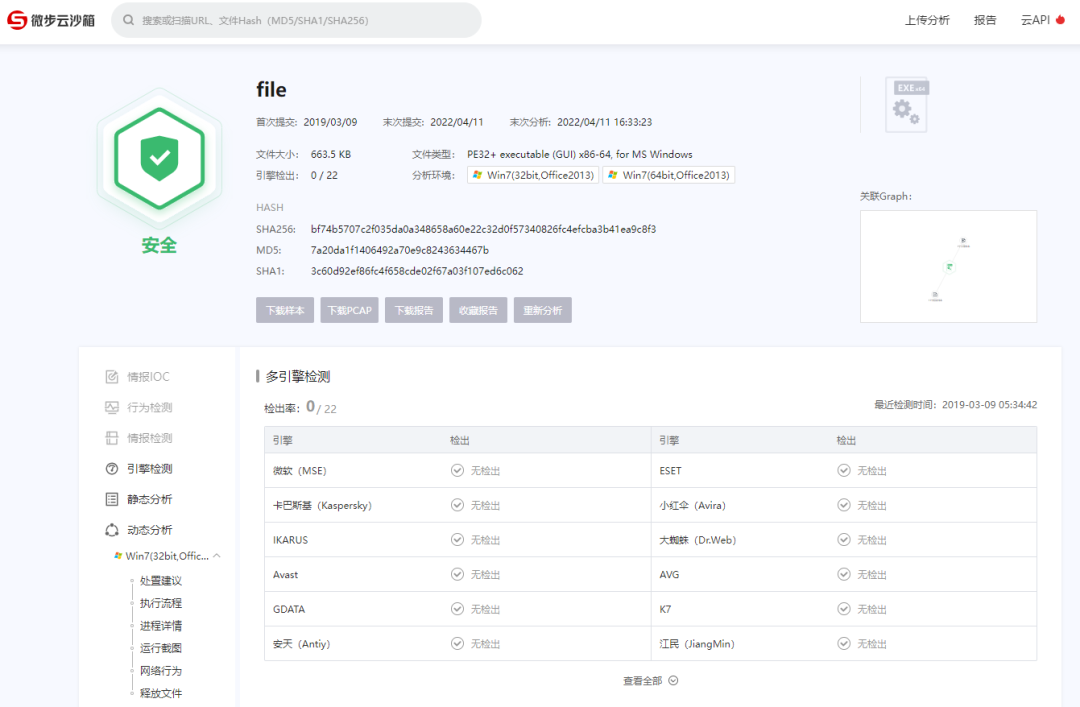
此时可以确认父进程是一个正常的进程。
2. 查找服务信息
为了进一步确认csrss.exe是由哪个服务执行的,需要另外执行工件从注册表中获取service详情.
2.1. 使用SFDFIR.Windows.System.Services查找进程所对应的服务:
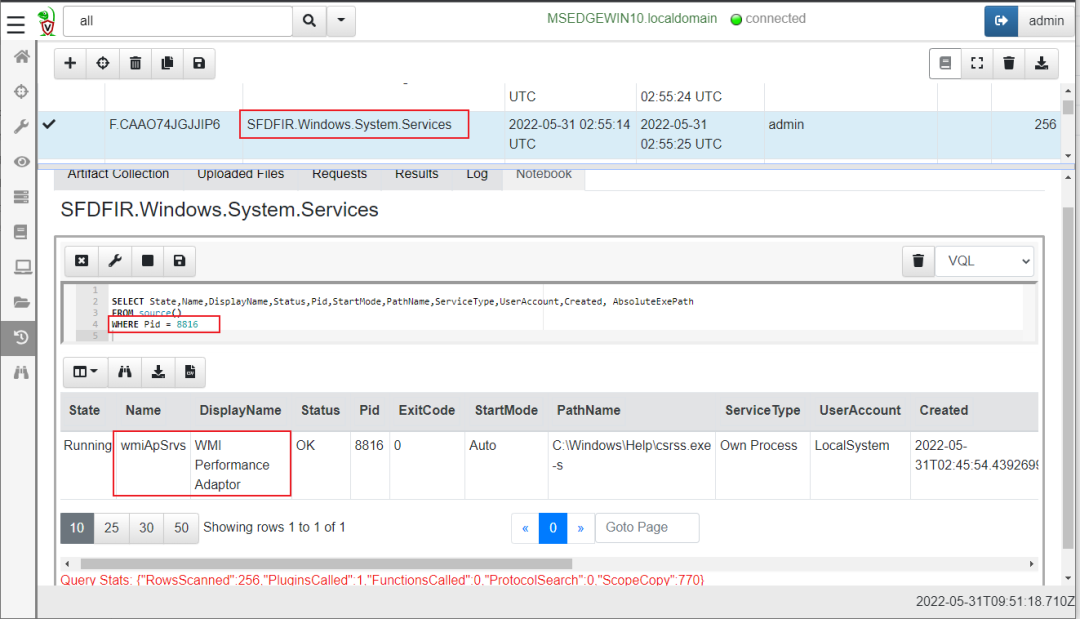
此时找到名为wmiApSrvs的服务,该服务与情报中的信息相符,可以确认该恶意文件为KoiMiner木马病毒。同时也确认服务创建时间是2022-05-31T02:45:54.4392699。
2.2 调查wmiApSrvs服务创建信息
路线1- SC方式创建service服务。
执行SFDFIR.Windows.EventLog.Process工件,获取进程启动历史记录,从历史记录中查找SC命令进程调用:
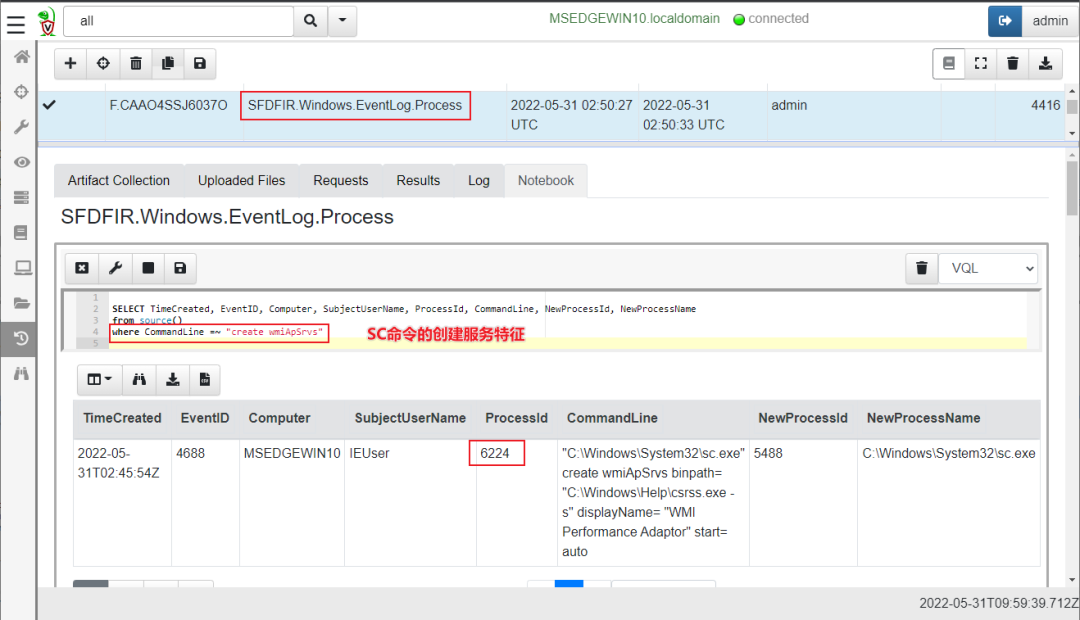
找到创建服务的进程是6224.
继续在SFDFIR.Windows.EventLog.Process查找6224进程信息:
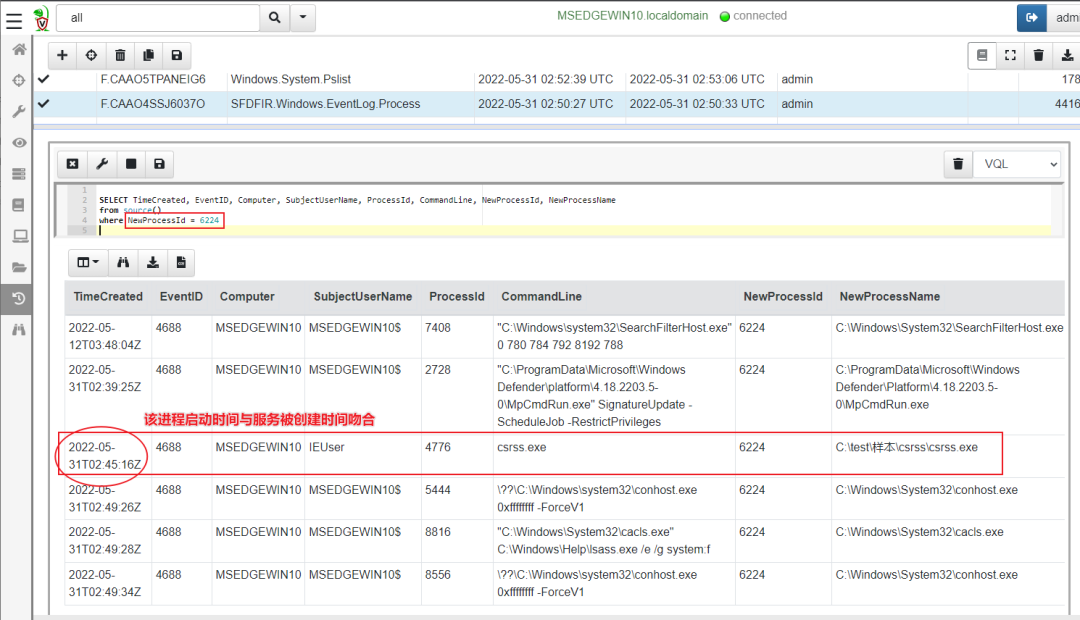
继续在SFDFIR.Windows.EventLog.Process查找4776进程信息:
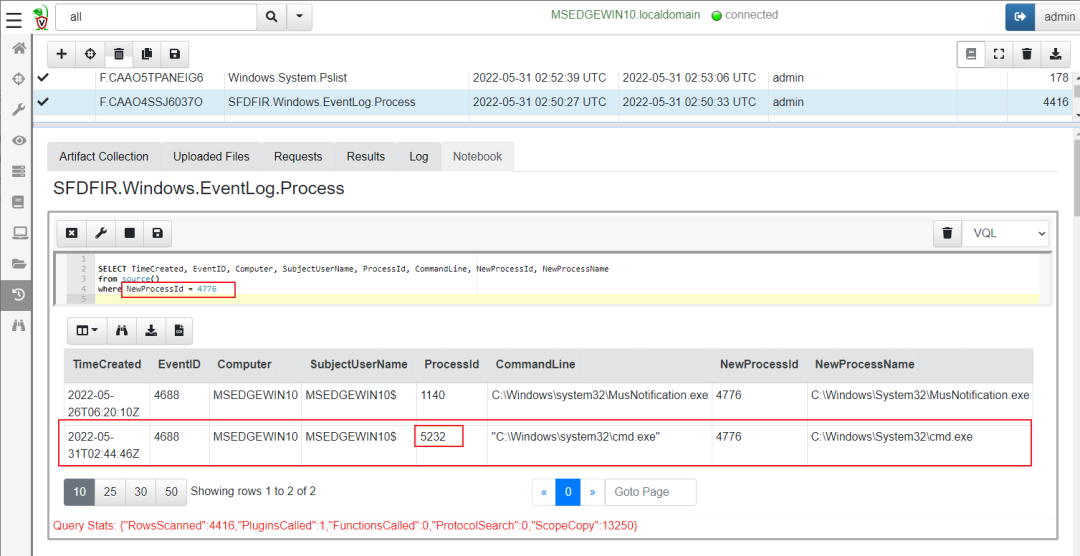
继续在SFDFIR.Windows.EventLog.Process查找5232进程信息:
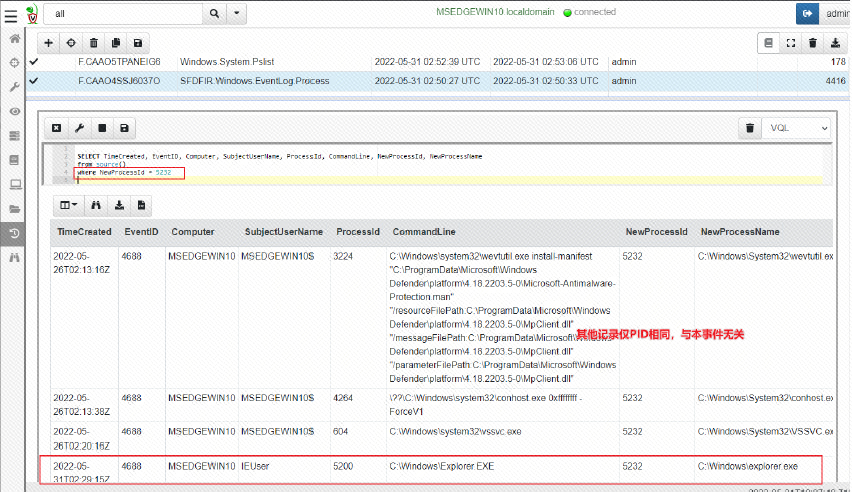
除红色框线内的,其他记录发现仅PID相同,与本事件无关。
2.3 返回到前面排查到的进程6224。
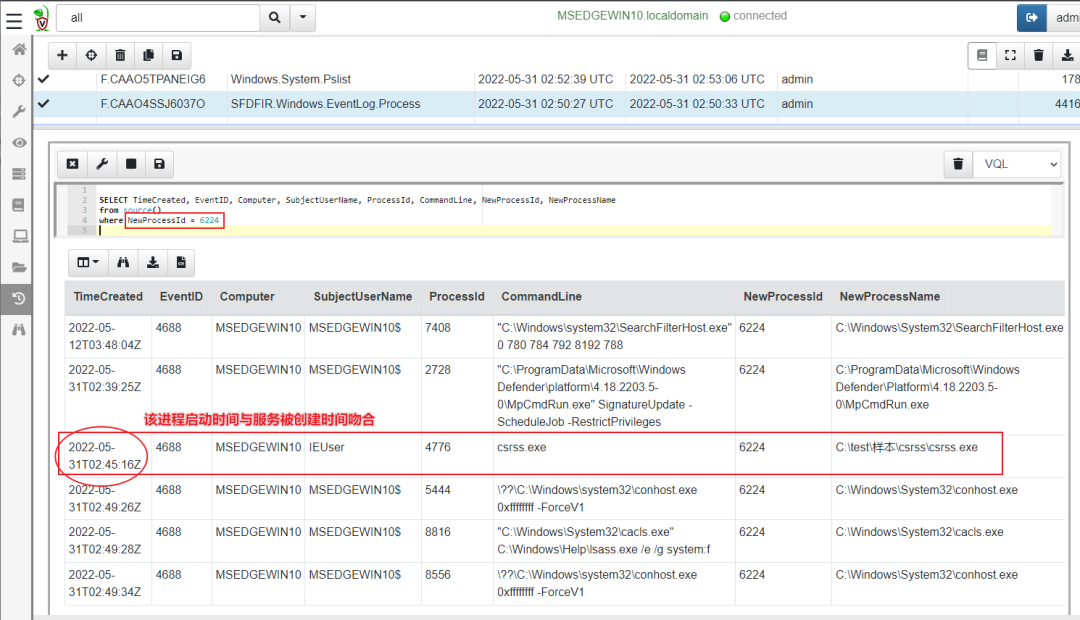
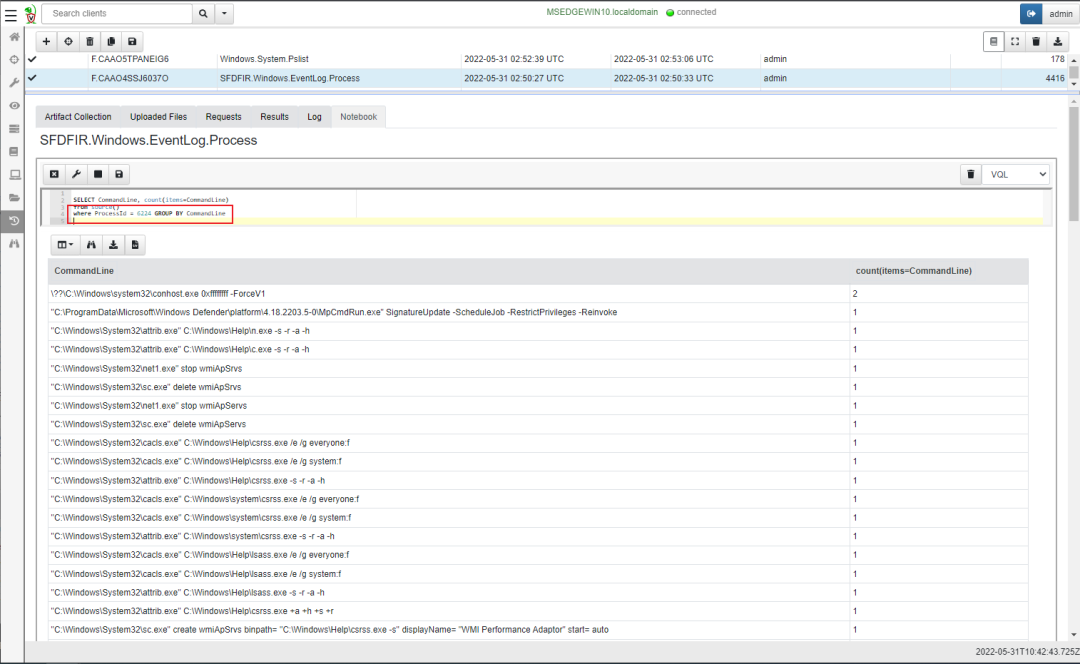
进一步排查恶意进程6224的动作,此时依然基于SFDFIR.Windows.EventLog.Process统计该进程执行的动作:
三、结论
执行过程
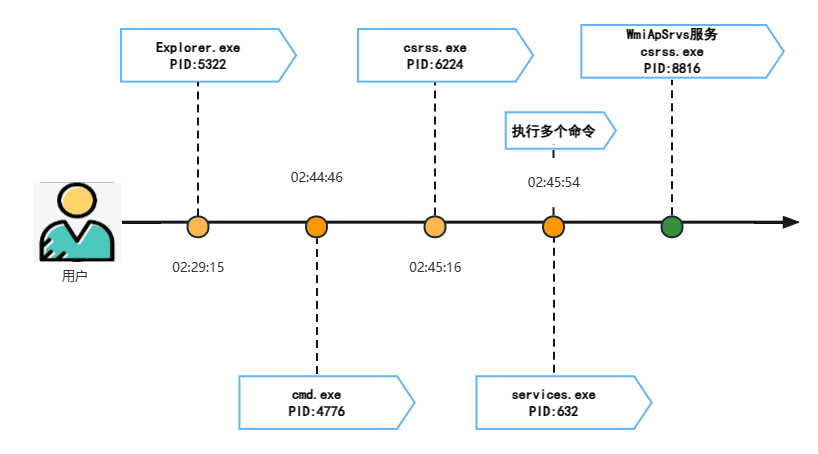
1. 用户IEUser通过资源管理器打开CMD,并执行了恶意程序csrss.exe;
2. 恶意程序csrss.exe创建了两个服务:
"C:\Windows\System32\sc.exe" create wmiApServs binpath= "C:\Windows\system\csrss.exe -p" displayName= "WMI Performance Adaptnr" start= auto
"C:\Windows\System32\sc.exe" create wmiApSrvs binpath= "C:\Windows\Help\csrss.exe -s" displayName= "WMI Performance Adaptor" start= auto
3. 恶意程序csrss.exe执行了以下命令:
\??\C:\Windows\system32\conhost.exe 0xffffffff -ForceV1 2
"C:\ProgramData\Microsoft\Windows Defender\platform\4.18.2203.5-0\MpCmdRun.exe" SignatureUpdate -ScheduleJob -RestrictPrivileges -Reinvoke 1
"C:\Windows\System32\attrib.exe" C:\Windows\Help\n.exe -s -r -a -h 1
"C:\Windows\System32\attrib.exe" C:\Windows\Help\c.exe -s -r -a -h 1
"C:\Windows\System32\net1.exe" stop wmiApSrvs 1
"C:\Windows\System32\sc.exe" delete wmiApSrvs 1
"C:\Windows\System32\net1.exe" stop wmiApServs 1
"C:\Windows\System32\sc.exe" delete wmiApServs 1
"C:\Windows\System32\cacls.exe" C:\Windows\Help\csrss.exe /e /g everyone:f 1
"C:\Windows\System32\cacls.exe" C:\Windows\Help\csrss.exe /e /g system:f 1
"C:\Windows\System32\attrib.exe" C:\Windows\Help\csrss.exe -s -r -a -h 1
"C:\Windows\System32\cacls.exe" C:\Windows\system\csrss.exe /e /g everyone:f 1
"C:\Windows\System32\cacls.exe" C:\Windows\system\csrss.exe /e /g system:f 1
"C:\Windows\System32\attrib.exe" C:\Windows\system\csrss.exe -s -r -a -h 1
"C:\Windows\System32\cacls.exe" C:\Windows\Help\lsass.exe /e /g everyone:f 1
"C:\Windows\System32\cacls.exe" C:\Windows\Help\lsass.exe /e /g system:f 1
"C:\Windows\System32\attrib.exe" C:\Windows\Help\lsass.exe -s -r -a -h 1
"C:\Windows\System32\attrib.exe" C:\Windows\Help\csrss.exe +a +h +s +r 1
"C:\Windows\System32\sc.exe" create wmiApSrvs binpath= "C:\Windows\Help\csrss.exe -s" displayName= "WMI Performance Adaptor" start= auto 1
"C:\Windows\System32\sc.exe" description wmiApSrvs "Provides performance library information from Windows Management Instromentation" 1
"C:\Windows\System32\attrib.exe" C:\Windows\system\csrss.exe +a +h +s +r 1
"C:\Windows\System32\net1.exe" start wmiApSrvs 1
"C:\Windows\System32\sc.exe" create wmiApServs binpath= "C:\Windows\system\csrss.exe -p" displayName= "WMI Performance Adaptnr" start= auto 1
"C:\Windows\System32\sc.exe" description wmiApServs "Provides performance library information from Windows Management Instromentations" 1
"C:\Windows\System32\net1.exe" start wmiApServs 1
时间轴
-
2022-05-31T02:29:15Z IEUser打开资源管理器
-
2022-05-31T02:44:46Z 启动cmd
-
2022-05-31T02:45:16Z 执行恶意程序”c:\test\样本\csrss.exe”
-
2022-05-31T02:45:54Z 创建wmiApSrvs服务
注:本篇报告为实验环境中搭建的失陷主机中挖矿病毒的演示场景,仅供内部响应人员DFIR的分享培训使用,非攻击事件。
本文首发于微信公众号「安小记」,原文链接。